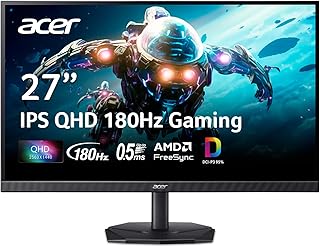

Acer KG271U
Today
Typical price$250
Amazon: the cheapest today among the stores checked
5.0 out of 10 on the spec sheet
Buy on Amazon Monitor Radar
Updated 12 Nov 2026
Gigabyte GS25F2A costs $95 less today and also has score 0.2 higher (5.2 vs. 5.0).
5.0score
5.2score · higher
Acer wins 1by componentGigabyte wins 1
Acer KG271U is the cheaperGigabyte GS25F2A is $95 the cheaper
By the spec rule for each use, the same one the lists on this site use.
Both work. Gigabyte GS25F2A is $95 cheaper.
Both work. Gigabyte GS25F2A is $95 cheaper.
Only Gigabyte GS25F2A works: Full HD with 100 Hz or more.
Neither one fits: Monitors for work and study, Monitors for creative work (photo and video), Monitors to use two on the desk.
Acer KG271U wins on image; Gigabyte GS25F2A wins on smoothness.
Amazon: the cheapest today among the stores checked
5.0 out of 10 on the spec sheet
Buy on AmazonAmazon: the cheapest today among the stores checked
5.2 out of 10 on the spec sheet +0.2
Buy on AmazonAffiliate links: if you buy, the store pays us a commission at no cost to you.
First data point for one of the two: the chart appears as the days go by.
Still only a few days of data for both to read the trend; the chart fills in as the days go by.
Updated 12/11/2026
Price divided by size and running cost, side by side.
| Math | Acer KG271U | Gigabyte GS25F2A |
|---|---|---|
| Price per inch | $9.26 | $6.19 menor |
| Item | Acer KG271U | Gigabyte GS25F2A |
|---|---|---|
| Screen | ||
| Type | Gaming (144 Hz or more) | Gaming (144 Hz or more) |
| Size changes | 27 ″ | 25 ″ |
| Resolution changes | QHD | Full HD |
| Pixel density changes | 109 ppi | 88 ppi |
| Aspect ratio | 16:9 | 16:9 |
| Stated HDR | HDR 10 | HDR 10 |
| Line changes | Nitro | not listed |
| Smoothness | ||
| Refresh rate changes | 180 Hz | 240 Hz |
| Response time (stated) changes | 0.5 ms | 1 ms |
| Sync changes | FreeSync | not listed |
| Connections | ||
| HDMI ports | 1 | 1 |
| DisplayPort ports | 1 | 1 |
| General | ||
| Model code changes | KG271U | GS25F2A |
 Acer KG271U orAOC 27G4ZR$269 · score 5.0Compare
 Gigabyte GS25F2A orAcer ED270$176 · score 4.8Compare
 Acer KG271U orMSI MP273QW$240 · score 5.2Compare
 Gigabyte GS25F2A orAcer KG271$255 · score 4.7Compare
 Acer KG271U orAcer KG240Y$154 · score 5.5Compare
 Acer KG271U orMSI 276CXF$250 · score 5.5Compare
Source: Amazon.ca catalog, checked on 12/11/2026.
Lowest price seen for the product on Amazon.ca, delivered to Toronto M5V 3L9, on the day it was read, before GST/HST. The model is the brand plus the name of the monitor; the versions go in the table. The price range, the median and the position use only models with a score; the price comparison looks at models whose score is within 0.5 points.
The spec score doesn’t measure the real calibration or durability, and the strong or weak point reading is just a comparison of numbers, not a buying recommendation.