
Updated 20 Nov 2026
How to choose a tablet for how you use it
By Bruno Barroso, Tablet Radar
46 new tablets compared, with today’s price (20/11/2026).
Torn between iPad, Galaxy Tab and Redmi Pad, and not sure what to pay for? Check your use and see.
Find out what I needStep 1 of 10
Check what you do
Each use asks for something different from the spec sheet.
A 12″ tablet with a top-end chip is money wasted for someone who just watches shows in bed, and an entry-level tablet wears out someone who wants to take class notes with a pen. Check what you do. In each step below, the rule comes with the tablets in today’s catalog that pass it.
How you will use the tablet
Check one or more. The panel combines the filters and shows what’s left in the catalog.
Check at least one use to see the tablets.
Step 2 of 10
Study and note-taking
A compatible pen and room for your files.
People who take class notes and read PDFs need a pen the tablet really supports, and not every pen works with every model. What the specs need to have: compatible pen and 128 GB or more. The rule only lets in tablets with the compatible pen confirmed in the specs. The pen is usually sold separately: add its price before deciding.
Of the 46 tablets on sale today, 6 meet this criterion: Supports a pen (confirmed), 128 GB, 256 GB or 512 GB or more and Tablet. Half cost $766.00 or less. The cheapest:


Not sure the tablet is enough for college? See when a tablet works and when it doesn’t.
Step 3 of 10
Watching videos and shows
A big, sharp screen matters more than the chip.
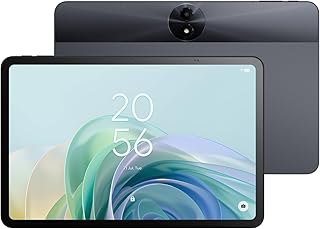
For videos and shows, what you see is the screen. The specs need to have: screen of 10″ or more with 180 ppi or more. ppi is dots per inch: the higher, the sharper the image. An OLED screen shows deeper black, but the Radar doesn’t measure picture quality in use. An entry-level chip handles video, so don’t pay for a chip you won’t use.
Of the 46 tablets on sale today, 25 meet this criterion: 10″ a 11,9″ or 12″ or more, 180 to 239 ppi or 240 ppi or more and Tablet. Half cost $472.00 or less. The cheapest:


Step 4 of 10
For a child
Case, parental controls and a price for kids who drop things.
Kids drop, spill and leave the tablet on the floor. That’s why this use has its own type: the kids tablet, sold with a protective case and a kids mode. The specs need to have: kids tablet, with a case and parental controls. Parental controls depend on setup by you; no model replaces your supervision.
No tablet in today’s catalog passes this rule.
The full path is in Tablet for a child: what to look at before buying.
Step 5 of 10
Working with a keyboard
A 10″ or larger screen and a chip that can handle multitasking.
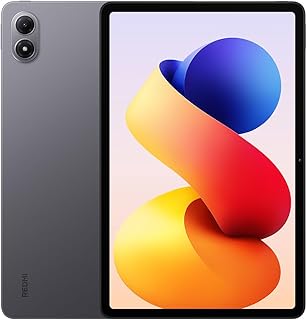
For writing, working on spreadsheets and making video calls with an attached keyboard, a small screen gets in the way and an entry-level chip chokes with many windows open. What the specs need to have: screen of 10″ or more, a mid-range chip and 128 GB. The keyboard and case are sold separately on most models. The iPad doesn’t list the RAM in the listing, so the rule looks at the chip.
Of the 46 tablets on sale today, 14 meet this criterion: 10″ a 11,9″ or 12″ or more, Apple M, Apple A, Snapdragon, MediaTek Dimensity or Samsung Exynos, 128 GB, 256 GB or 512 GB or more and Tablet. Half cost $573.00 or less. The cheapest:


Not sure how much storage to ask for? Read How much storage a tablet needs.
Step 6 of 10
Gaming
The chip rules; the score doesn’t measure gaming.
For gaming, the part that weighs the most is the chip. The specs need to have: Apple, Snapdragon or Dimensity chip and 128 GB. The Radar compares chips using our own table of families and generations and doesn’t measure how many frames per second the tablet delivers in each game. Big games also take up space, and storage runs out fast.
Of the 46 tablets on sale today, 10 meet this criterion: Apple M, Apple A, Snapdragon or MediaTek Dimensity, 128 GB, 256 GB or 512 GB or more and Tablet. Half cost $516.00 or less. The cheapest:
Step 7 of 10
Reading
A screen up to 11.9″ that fits in your hand.
People who read books and articles prefer a tablet they can hold in one hand for an hour. The specs need to have: screen up to 11.9″ with 180 ppi or more. Sharp text tires your eyes less. For reading, the chip hardly weighs on the decision, and the money goes further on the screen.
Of the 46 tablets on sale today, 19 meet this criterion: up to 12″, 180 to 239 ppi or 240 ppi or more and Tablet. Half cost $434.00 or less. The cheapest:
Step 8 of 10
The cheapest one worth buying
An entry-level tablet you won’t regret.
The cheapest tablet in the catalog usually has a weak chip and little space, and freezes within six months. The "cheapest worth buying" rule asks for: known chip, 64 GB or more and a 10″ screen. It’s an editorial choice by the Radar, not a standard: it separates roomy specs from tight ones.
Of the 46 tablets on sale today, 13 meet this criterion: Apple A, Snapdragon, MediaTek Dimensity, MediaTek Helio and Kompanio or Samsung Exynos, 64 GB or less, 128 GB or 256 GB, 10″ a 11,9″ and Tablet. Half cost $553.00 or less. The cheapest:
Step 9 of 10
When paying more stops paying off
The price rises faster than the score.
In the lower ranges, one extra point of spec score costs about -$81.00 (from score of 4 to 5.9 to score from 6 to 6.9). In the higher ranges, the same point costs about $145.00 (from score from 6 to 6.9 to score from 7 to 7.9). The calculation divides the difference in median price by the difference in median score between neighboring ranges.
That doesn’t mean expensive is bad. It means that, past a certain range, you pay a lot for a small improvement in the specs. See the full calculation in the panorama and compare two tablets in the comparison tool.
Step 10 of 10
The pick
The ones mentioned in the guide, with today's price and the store.
- No proven discount
Huawei
MatePad 11.5″$403.96
Today’s price
Best price at Amazonchecked today
No public coupon today · the store may release one just for you on the page, be sure to checkWhy choose it
Who it’s forStudy and note-taking
Pros120 Hz · above average
- No proven discount6.86.8
Samsung
Galaxy Tab S10 Lite$646.86
Today’s price
Best price at Amazonchecked today
No public coupon today · the store may release one just for you on the page, be sure to checkWhy choose it
Who it’s forStudy and note-taking
Pros467 g · below average · Pen
Cons7,040 mAh · below average
- No proven discount7.27.2
Samsung
Galaxy Tab S10 FE$717.78
Today’s price
Best price at Amazonchecked today
No public coupon today · the store may release one just for you on the page, be sure to checkWhy choose it
Who it’s forStudy and note-taking
ProsPen
Which pen, screen and chip each use calls for
- 46tablets in the catalog
- 20/11price date
Each use calls for a minimum in the specs. For studying and note-taking, compatible pen and 128 GB or more: 6 tablets in the catalog meet it, from $404.00. Working with a keyboard and gaming call for more chip, and the price rises with them. Today there are 46 tablets in the catalog, from $177.00.
| If you want | You need | Tablets that meet them | From |
|---|---|---|---|
| Study and note-taking | compatible pen and 128 GB or more | 6 of 46 | $404.00 |
| Watching videos and shows | screen of 10″ or more with 180 ppi or more | 25 of 46 | $333.00 |
| For a child | kids tablet, with a case and parental controls | no benchmark in the catalog | no data |
| Working with a keyboard | screen of 10″ or more, a mid-range chip and 128 GB | 14 of 46 | $378.00 |
| Gaming | Apple, Snapdragon or Dimensity chip and 128 GB | 10 of 46 | $378.00 |
| Reading | screen up to 11.9″ with 180 ppi or more | 19 of 46 | $333.00 |
| The cheapest one worth buying | known chip, 64 GB or more and a 10″ screen | 13 of 46 | $333.00 |
The best by price range
Next step
See the tablets that fit you
Each point is a new tablet, by price and spec score.
Frequently asked questions
How can you tell if a tablet is good without trying it?
Use the Radar’s spec sheet score, from 0 to 10. It combines performance, screen, longevity, battery and features and how current it is, with public weights. Compare tablets at a similar price and look at the component that matters for your use. The score doesn’t measure real performance, durability or support.
Is it worth paying more for a tablet?
It depends on the range. Among the cheapest tablets, one point of spec sheet score costs about -$81.00; among the most expensive, about $145.00. Past a certain range, the price rises much faster than the score.
Do I need a pen on the tablet?
Only if you will take notes, draw or sign documents. For video, reading and gaming, the pen isn’t needed. When you need one, check in the specs whether the model supports a pen and which one, because the pen is usually sold separately and not every pen works with every model.
How much storage do I need on the tablet?
For studying, work and gaming, the Radar’s rule is 128 GB or more. For video and reading, 64 GB may be enough if you use the cloud. The free space is less than the advertised number, because the system takes up part of it. The storage guide does the math with today’s catalog.
Which tablet should I buy for the budget I have?
Check your use and your price cap in "Help me choose" and the chart shows the tablets that fit, with the score next to each. Today there are 46 tablets in the catalog, from $177.00. The Radar shows the top-scoring one within your filter and doesn’t say it suits everyone.
How do I read the chart?
Each dot is a new tablet. The further right, the more expensive; the higher up, the better the spec sheet score. The price uses a logarithmic scale: each step is worth more Australian dollars than the one before, so the cheaper tablets don’t get bunched together. The line connects the tablets that no other, among those filtered, beats on both score and price at once. Compare tablets with similar screens: the price goes up with size.
Where does the score come from?
From the tablet’s spec sheet, with public weights (performance, screen, longevity, battery and features e recency). It shows what the specs promise, not how the tablet performs in use. The full calculation is in How we calculate the score.
Why do some tablets appear without a score?
Because the store’s spec sheet doesn’t give enough information: we need at least the chip identified by name ("Octa Core" is not enough) and three more parts of the spec sheet, such as the screen, the storage and the battery. We’d rather leave a tablet without a score than make one up. Those models stay off the chart and remain in the table, with the price and the button to compare stores.
Is the price on the chart what I’ll pay?
This is the lowest upfront price from Amazon.com.au, an Amazon.com.au seller rated 4.0 with 100 or more sales, or the brand’s official store on the date we checked. It changes without notice. The buy button goes straight to the store, where the price of the day applies.
Read next
Where the numbers come from
Each rule is a Radar criterion, not a standard: we chose floors for storage, screen, chip and pen that fit the use described. The numbers (how many tablets pass, median price, the cheapest) come from the catalog of the latest check. The spec sheet score doesn’t measure real performance.
The guide helps you decide and doesn’t recommend a tablet for you: the final price is the one at the store, and the spec score doesn’t measure real-world performance or durability.
Data from 20 Nov 2026.