
Updated Nov 6, 2026
How to choose a laptop for how you use it
187 new laptops compared, with today’s price (06/11/2026).
Torn between 8 GB, 16 GB and the price, and not sure what to pay for? Check your use and see.
Find out what I needStep 1 of 8
Check what you do
Each use asks for something different from the spec sheet.
A gaming laptop is too expensive and heavy for someone who just writes and watches classes, and an entry-level laptop can’t handle someone who edits video. Check what you do. In each step below, the rule comes with the laptops in today’s catalog that pass it.
How you will use the laptop
Check one or more. The panel combines the filters and shows what’s left in the catalog.
Check at least one use to see the laptops.
Step 2 of 8
Study and basic use
Memory and SSD matter more than the processor.
For online classes, schoolwork, documents and spreadsheets, the specs need to have 8 GB of RAM and 256 GB of SSD. An entry-level processor is enough, and a dedicated graphics card changes nothing for this use. The rule is an editorial choice by the Radar, not a standard: it separates roomy specs from tight ones.
159 of the 187 laptops in the catalog pass this rule. Their median price is $1,000.00 and the median spec score is 7.2. The cheapest:

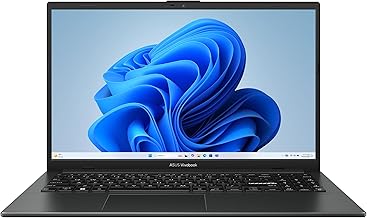

The full calculation, with screen, weight and system, is in Laptop for studying: what the specs need to have.
Step 3 of 8
Work and office
Lots of tabs, video calls and spreadsheets.
In the office and working from home, the laptop stays on all day, with a browser full of tabs, email, spreadsheets and video calls at the same time. The specs need to have: 8 GB of RAM, 256 GB and a mid-range processor. A Full HD screen and ports for a monitor and charger matter more here than for studying.
94 of the 187 laptops in the catalog pass this rule. Their median price is $1,012.00 and the median spec score is 7.0. The cheapest:


Not sure how much memory and SSD? Read How much RAM and SSD your laptop needs.
Step 4 of 8
Programming
The editor, the browser and the tests open together.
People who code keep an editor open, a browser with documentation, a terminal and, often, a database or containers at the same time. The bottleneck is usually memory, not the graphics card. The specs need to have: 16 GB of RAM, 512 GB and a mid-range processor.
123 of the 187 laptops in the catalog pass this rule. Their median price is $1,288.00 and the median spec score is 7.6. The cheapest:


See the full path in Laptop for coding and for photo and video editing.
Step 5 of 8
Photo and video editing
Processor, memory, SSD and graphics card.
Photos call for memory and a processor; video also calls for a big SSD for the files and, in the heaviest editing, a dedicated graphics card. The specs need to have: 16 GB of RAM, 512 GB and a high-end processor. The specs rarely list the screen’s color accuracy, and the Radar doesn’t measure it: if color matters for your work, see the screen in person before you buy.
96 of the 187 laptops in the catalog pass this rule. Their median price is $1,473.00 and the median spec score is 8.2. The cheapest:


Step 6 of 8
Gaming
The graphics card rules; the score doesn’t measure gaming.
For gaming, the part that weighs the most is the dedicated graphics card, followed by memory. The specs need to have: dedicated graphics card and 16 GB of RAM. The Radar score uses our own table of graphics card families and generations and doesn’t measure how many frames per second the laptop delivers in each game.
47 of the 187 laptops in the catalog pass this rule. Their median price is $1,700.00 and the median spec score is 8.1. The cheapest:


Step 7 of 8
Light enough to carry every day
Weight and battery capacity, not promised hours.
To carry in a backpack every day, weight and battery capacity matter. The specs need to have: up to 1.6 kg. The capacity in Wh appears in the specs when the catalog lists it; how many hours the laptop lasts, the Radar doesn’t measure.
No laptop in today’s catalog meets this cutoff.
Step 8 of 8
When paying more stops paying off
The price rises faster than the score.
In the lower ranges, one extra point of spec score costs about $202.00 (from score below 5 to score from 5 to 5.9). In the higher ranges, the same point costs about $610.00 (from score from 7 to 7.9 to score 8 or more). The calculation divides the difference in median price by the difference in median score between neighboring ranges.
That doesn’t mean expensive is bad. It means that, past a certain range, you pay a lot for a small improvement in the specs. See the full calculation in the panorama and compare two laptops in the comparison tool.
Which memory, SSD and screen each use calls for
- 187laptops in the catalog
- 06/11price date
Each use calls for a minimum in the specs. For studying, 8 GB of RAM and 256 GB of SSD: 159 laptops in the catalog meet it, from $370.00. Coding, editing and gaming call for more in the specs, and the price rises with them. Today there are 187 laptops in the catalog, from $200.00.
| If you mostly use it for | You need | Laptops that meet them | From |
|---|---|---|---|
| Study and basic use | 8 GB of RAM and 256 GB of SSD | 159 of 187 | $370.00 |
| Work and office | 8 GB of RAM, 256 GB and a mid-range processor | 94 of 187 | $445.00 |
| Programming | 16 GB of RAM, 512 GB and a mid-range processor | 123 of 187 | $479.00 |
| Photo and video editing | 16 GB of RAM, 512 GB and a high-end processor | 96 of 187 | $479.00 |
| Gaming | dedicated graphics card and 16 GB of RAM | 47 of 187 | $839.00 |
| Light enough to carry every day | up to 1.6 kg | no benchmark in the catalog | no data |
The best by price range
Next step
See the laptops that fit your criteria
Each point is a new laptop, by price and spec score.
Frequently asked questions
How can you tell if a laptop is good without trying it?
Use the Radar’s spec sheet score, from 0 to 10. It combines performance, memory and storage, screen, portability and ports with public weights. Compare laptops at a similar price and look at the component that matters for your use. The score doesn’t measure real performance, temperature or battery durability.
Is it worth paying more for a laptop?
It depends on the range. Among the cheapest laptops, one point of spec sheet score costs about $202.00; among the most expensive, about $610.00. Past a certain range, the price rises much faster than the score.
Do I need a dedicated graphics card?
Only if you use it for gaming or heavier video editing. For studying, the office and coding, the graphics built into the processor are enough, and paying for a dedicated card makes the laptop pricier and usually heavier. Each model’s specs say which graphics card it has.
How much RAM and SSD do I need?
For studying and light office work, 8 GB of RAM and 256 GB of SSD is the reasonable minimum. For coding, photo editing or lots of open tabs, 16 GB of RAM and 512 GB of SSD give you room. These are Radar rules, not standards; the RAM and SSD guide does the math with today’s catalog.
Which laptop should I buy for the budget I have?
Check your use and your price cap in "Help me choose" and the chart shows the laptops that fit, with the score next to each. Today there are 187 laptops in the catalog, from $200.00. The Radar shows the top-scoring one within your filter and doesn’t say it’s the best for everyone.
How do I read the chart?
Each dot is a new laptop. The further right, the more expensive; the higher up, the better the spec sheet score. The price uses a logarithmic scale: each step is worth more dollars than the one before, so the cheaper laptops don’t get bunched together. The line connects the laptops that no other, among those filtered, beats on both score and price at once. Compare laptops with similar screens: the price goes up with size.
Where does the score come from?
From the laptop’s spec sheet, with public weights (performance, memory and storage, screen, portability e ports and how current it is). It shows what the specs promise, not how the laptop performs in use. The full calculation is in How we calculate the score.
Why do some laptops appear without a score?
Because the store’s spec sheet doesn’t give enough information: we need at least the processor, memory and storage, plus the screen or the year. We’d rather leave a laptop without a score than make one up. Those models stay off the chart and remain in the table, with the price and the button to compare stores.
Is the price on the chart what I’ll pay?
This is the lowest upfront price from the brand’s official store, a partner store, the store’s own or a seller rated 4.0 with 100 or more sales on the date we checked. It changes without notice. The buy button goes straight to the store, where the price of the day applies.
Read next
Where the numbers come from
Each rule is a Radar criterion, not a standard: we chose floors for memory, storage, screen and weight that fit the use described. The numbers (how many laptops pass, median price, the cheapest) come from the catalog of the latest check.
The guide helps you decide and doesn’t recommend a laptop for you: the final price is the one at the store, and the spec score doesn’t measure real-world performance or durability.
Data from Nov 6, 2026.